

This is a personal review of Sellfy, which I am currently using.

Backstory
I own a website (yes, you’re already here). 🙂
I wanted to create and sell an eBook utilizing my WordPress website. There’s an article I wrote that I’m currently running a small paid advertisement for on Pinterest. I’ve never had much traffic but this pin is really helping drive people to my website. Obviously, I don’t want to run an ad forever. Hopefully one day (not 10 years from now) my organic traffic picks up.
I wanted to hurry up and put an eBook out there so I could try to monetize on the additional traffic to my website.
I spent days pulling from previous articles I had written to create an eBook. It also had to be extra special since I’m asking for people to pay for this eBook and everything else on my website was free.
Once I was done writing, I utilized Canva to make it pretty. I never realized how many fantastic templates Canva has available. Finally, I finished the eBook in about a week.
I did a Google search on how to sell an eBook on WordPress and that sent me to a plugin. After thirty minutes of doing the step by step directions, I received some sort of critical error and immediately deleted the plugin. I actually am scared of plugins as I’ve had multiple issues when trying something new in the past.
I’m by no means an expert at creating a website, but I’m getting by.
Enter Sellfy
All of this being said, I decided to try Sellfy. I visited the homepage and saw “Easy-to-use eCommerce for creators. Sell merchandise or digital products — all from one place.”.
Ok, cool. Digital product selling is what I need.
I really like that Sellfy offers a free 14-day trial period with no credit card information required. Who does that? Every time I sign up for anything trial related, there’s a credit card that has to be entered. Seriously – way to go, Sellfy!
Creating The “Store”
Once I was rolling with a free trial, I only had one eBook item (😅) to place in the store, so it took me no time to get it up and going.
The colors and such were not my style at all, so I changed all the basics.
I have to say, making the changes on the Sellfy store was so much easier than the changes I make on my own website. I mean, it was simple changes like colors and such, but the time it took was literally less than five minutes for my “store” of one item to be up and going.
Another feature that I love is the “name your price”. I know I’m not going to sell a lot of these eBooks. It’s my first one, I have very little traffic, and it’s only thirty-one pages with a lot of those pages being Chapter Headings.
In reality, I’m wanting feedback, some type of activity, and help offsetting the $5 per day I’m spending on Pinterest.
Taking all of that into consideration, I set my eBook price at $1.00 with the option for people to adjust the price higher if they wanted because maybe someone will pity me.
Pretty much, I stare at it daily to see if anyone will purchase my eBook, which is entertaining to me. It’s giving me something besides visitor count to stare at.

Tie It Together
So the store was made. My one eBook was ready to go.
Now how do I get people to the store?
“Sellfy creators can connect their store to an existing website, use their store as the main domain, or drive traffic from other channels with attractive “Buy now” buttons and other embed options.”
Ok, well, I want the easy way out. Basically, the eBook on my website has a direct link to purchase from my Sellfy page.
Here’s a link to where I direct people to go to purchase this particular eBook. Here’s a link to the actual store: https://financesforfemales.sellfy.store/

Cost
With one eBook, I definitely opted for the Starter plan, which starts at $19 per month. I’m paying more than that because I didn’t want to sign up for a year. See all plans below:
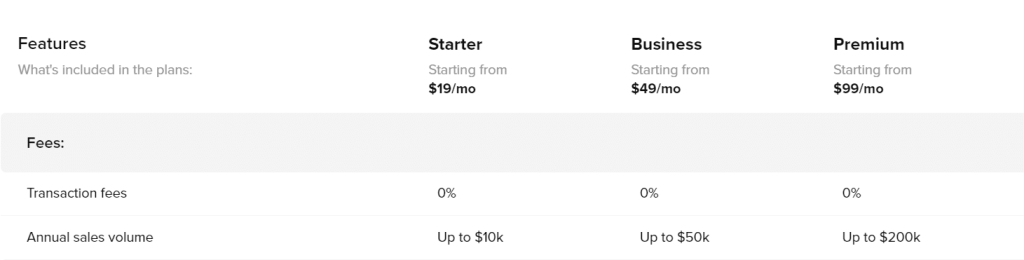
The great thing is that there are no transaction fees. The not so great is that you’ll still have to pay Stripe or PayPal’s processing fees. You’d have to pay these regardless. The fee is 2.9% + $0.30.
If you pass their annual sales volume caps, you would then look at additional charges. I don’t think I have to worry about that.
Final Thoughts
Did you guys know Sellfy does print on demand?
“Sellfy is an easy-to-use eCommerce platform for creators to sell digital and physical products. It’s also on its way to becoming one of the leading platforms for selling high-quality print-on-demand (POD) merchandise.
Creators who sign up for Sellfy will have a rich selection of merch categories to choose from: clothing, hats, bags, home decor, and phone cases.”
Hmmmm… Interesting new venture maybe?
Eh, I have my plate full right now. It’s not exactly the right time for me to start anything, but maybe it’s giving you some ideas.
In conclusion, super happy with this new way of selling items on my website! It’s basic, simple to use, and cheap(ish).
One day, when I sell something, I’ll update you again.

0 Comments